Personal project · November 2026

I was exporting the same clip six times.
So I built DropCut.

DropCut is a Mac app I built for my gaming channel, The Gamer Aadi. I record a clip on my Xbox, and about a minute later I have branded, captioned cuts for TikTok, Reels, Shorts, YouTube and X, ready to post.

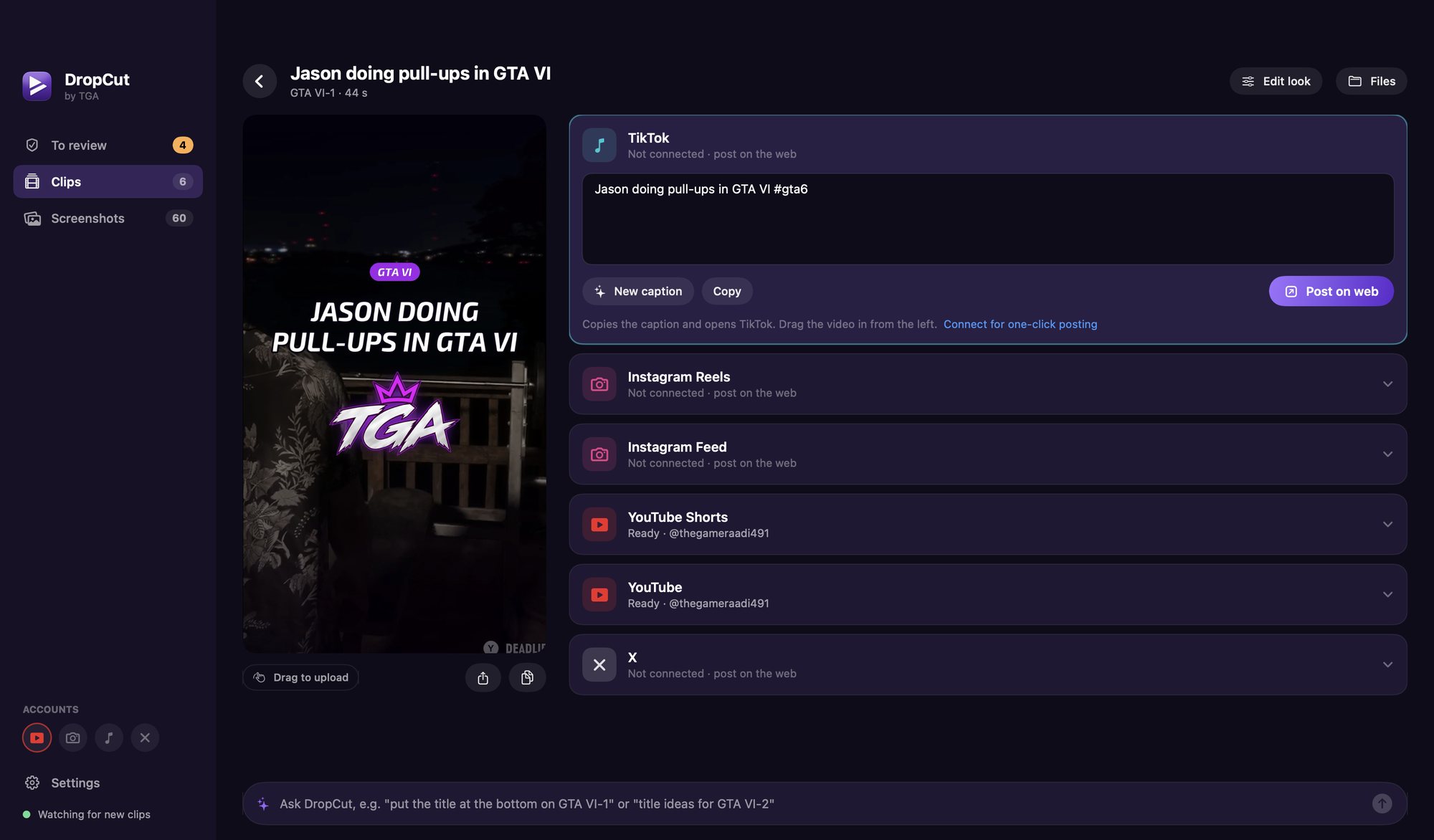
DropCut showing one clip: a vertical preview on the left, and TikTok, Instagram, YouTube and X rows on the right, each with its caption and a post button
6platform-ready cuts from every clip
~1 minfrom Xbox capture to ready to post
<1 sfor a fresh AI caption
9 daysfrom first build to version 3.1
Why I built it

The busywork was longer than the clip.

I play on Xbox and run The Gamer Aadi across TikTok, Instagram, YouTube and X. Short-form rewards posting everywhere, but every platform wants something different: vertical or wide, 60 seconds or 90, its own cover, its own caption.

One 40-second clip meant six exports, three aspect ratios, a thumbnail and four captions, all done by hand after the fun part was over. Off-the-shelf editors could do each step, but nothing did the whole chain for a console player who posts alone.

So I set myself a simple brief: I should only ever have to play, check and press Post.

How it works

Play. DropCut cuts. I post.

DropCut watches the folder my Xbox captures sync to and runs every clip through the same pipeline.

In

Xbox clip

Captured on the console, synced to my Mac through OneDrive. Any video or screenshot dropped on DropCut works too.

→
DropCut engine

Cut, brand, write

  • 1Trims long clips to their loudest stretch, which is usually the action
  • 2Crops for each format: 9:16, 4:5 and 16:9
  • 3Puts my logo in the calmest corner so it never covers the play
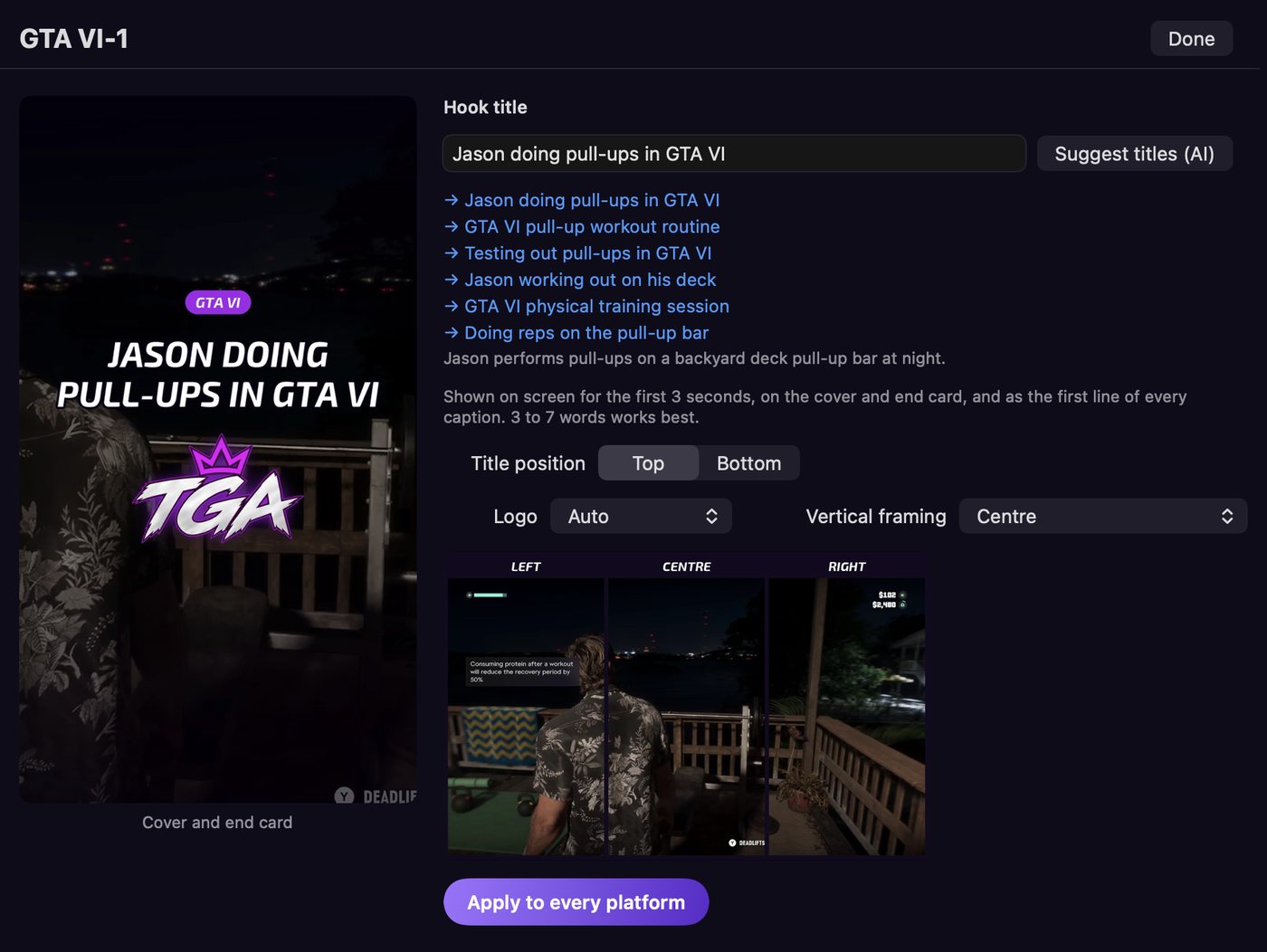
  • 4Adds a hook title for the first 3 seconds and a branded end card that doubles as the cover
  • 5Writes a title and a caption for each platform with AI
→
Out

Six ready cuts

TikTokInstagram ReelsInstagram FeedYouTube ShortsYouTubeX
One click posts to a linked account. Or "Post on web" copies the caption and opens the upload page.
1

Record on Xbox

Nothing changes about how I play or capture.

2

DropCut cuts it

Every platform's version lands in its own folder, named like GTA VI-3 instead of a timestamp.

3

I check and post

Read the caption, ask for a new one if I don't like it, press Post.

Product decisions

Small calls that made it usable.

I was the only user, which made feedback instant and brutally honest.

🛡️

Nothing goes out without a check

GTA VI launched while I was building. New clips from it wait in a To review queue until I mark them safe, so a story spoiler never reaches my feed by accident.

🎯

One main button per screen

Version 3.0 worked, but it felt like a control panel. Version 3.1 rebuilt the clip page around one question, "where do you want to post this?", with one main button for each platform.

⚡

Fast beats fancy

The larger AI model took minutes on images. Switching to a lighter model brought captions down to under a second, and quality held up for short hooks.

🧭

Work around platform limits, don't wait on them

YouTube and TikTok keep posts from new apps private until a review passes. So every platform also gets "Post on web", which works today.

🔒

Local first

It runs on my Mac. Clips never leave it unless I post them, and account sign-ins live in the macOS Keychain.

DropCut's Edit look window: cover preview, AI title ideas, title position, logo corner and framing options
Under the hood

What it's made of.

About 4,900 lines across a native Mac app and a processing engine.

Mac app

Swift and SwiftUI. Library, clip page, editor, settings and a plain-language chat bar ("put the title at the bottom on GTA VI-1").

Processing engine

Python with FFmpeg and Pillow. It cuts, crops, picks the loudest stretch, places the logo and renders the title and end-card animation.

AI

Google Gemini Flash-Lite reads frames from the clip for title ideas and writes captions per platform. Everything still works without it.

Posting

OAuth 2.0 sign-in with PKCE for YouTube, Instagram, TikTok and X, resumable uploads, and tokens stored in the macOS Keychain.

Trust

Terms, privacy policy and licence written for the platform reviews, plus a spoiler-review queue.

How I built it

My background is product and category management, not engineering. I designed DropCut, made every product call and tested it on my own clips, and built it with AI coding agents.

Build log

Nine days, six versions.

10 NOV · v1.0

A menu-bar helper

Watched my Xbox folder and made a vertical cut with my logo.

10 NOV · v1.1

A real window

A library for clips and screenshots, plus more than one watch folder.

18 NOV · v2.0

Every platform

Per-platform folders and lengths, covers, the branded end card, a clip editor and the spoiler-review queue.

18 NOV · v2.1

AI joins in

Title ideas from the clip's own frames, automatic titles and the chat bar.

18 NOV · v3.0

Posting and polish

Browse each clip in the app, connect accounts and post, plus terms and privacy pages.

19 NOV · v3.1

Simple, on brand

Redesigned around one action per screen, with AI captions, Post on web and title placement.

The library

Every clip, ready when I am.

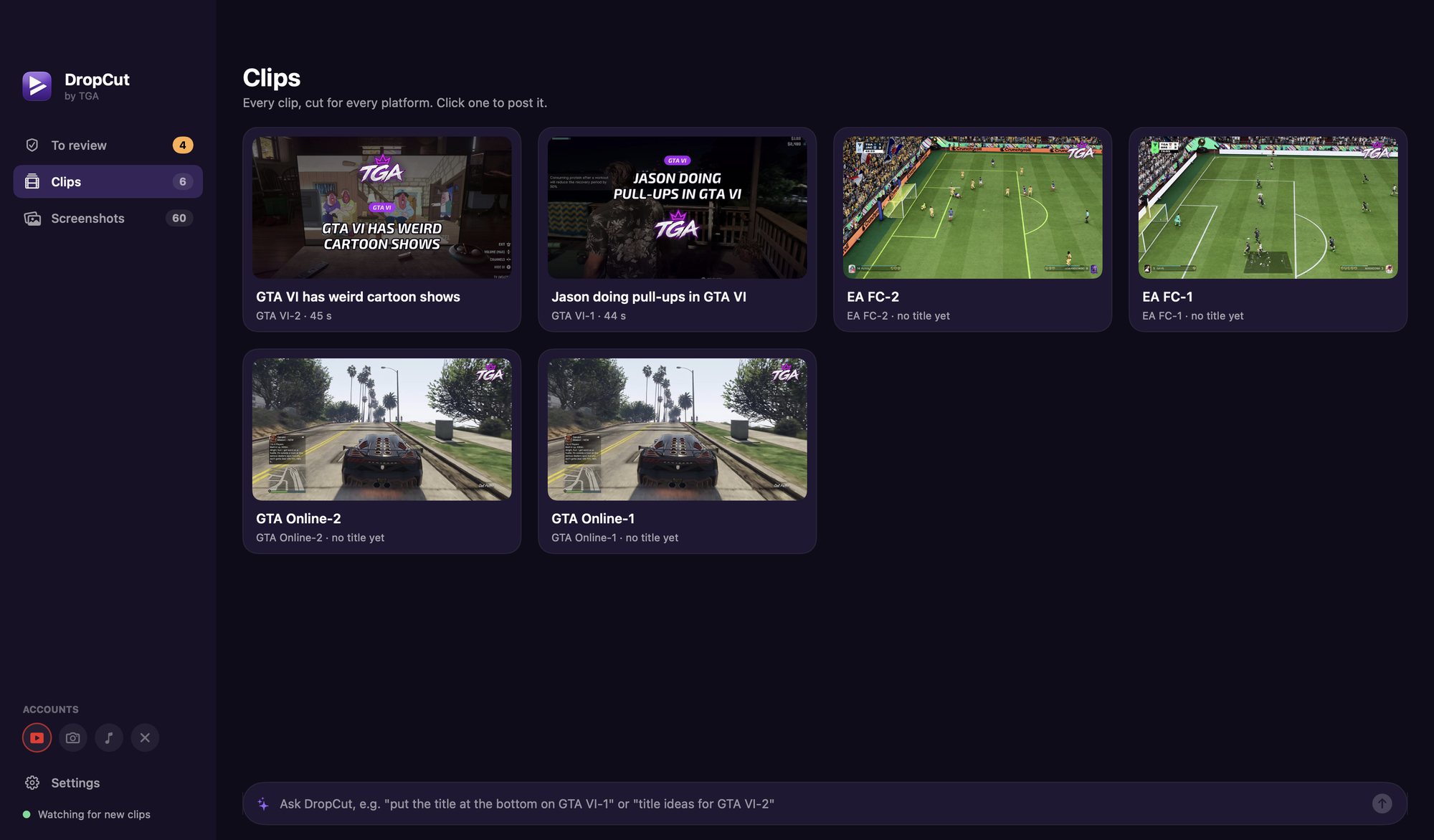
DropCut's clip library with branded thumbnails and titles
Say hi

Want to see it running?

I'm happy to walk through DropCut, the decisions behind it, or how I build with AI. DropCut is a personal tool and isn't for sale.